The bank vs the safe: custody in plain English
Before any feature list means anything, you need one distinction locked in, because every crypto disaster story of the last decade flows from misunderstanding it.
A custodial platform — an exchange like Binance or Bybit — is a bank. You have an account, they hold the keys, and what you own is effectively an IOU. Forget your password? Support resets it. Platform collapses, freezes withdrawals, or gets hacked? You queue with the other creditors. FTX made that lesson cost $8 billion.
A non-custodial wallet is a personal safe. The private keys are generated on your device and never leave it. Nobody can freeze, censor or confiscate the funds — and nobody can help you back in if you lose the combination. There is no "Forgot password?" in self-custody. The recovery phrase is the money.
The CoinFlip Wallet is firmly in the second category. CoinFlip's own materials are unambiguous: keys on device, full user control, the company cannot touch your balance. This is the model CoinFlip launched with its Olliv platform in April 2023 — explicitly pitched as a post-FTX trust rebuild — and carried into the current CoinFlip Crypto Wallet that reached Australia and New Zealand in November 2024.
Auditor's note02 — Under the hood"Self-custody" is a security architecture, not a security guarantee. It removes counterparty risk (the company running off with funds) and replaces it with operational risk (you mishandling keys). Most people lose crypto the second way. The rest of this audit is about managing that trade.
How the CoinFlip Wallet actually holds your crypto
When you create a wallet in the app, it generates a recovery phrase (a human-readable encoding of your master private key, following the BIP-39 standard used across the industry). From that phrase, the wallet derives addresses for each supported asset. Three properties follow, and they're worth internalising:
- The phrase is the wallet. The app, your phone, your CoinFlip registration — all replaceable. Anyone holding those words on any device anywhere holds your funds. That's why no legitimate support agent will ever ask for it.
- Your coins aren't "in" the phone. They live on the blockchain; the phone holds the keys that move them. Smashing your phone loses nothing if the phrase is backed up. Leaking the phrase loses everything even if the phone is safe in your pocket.
- CoinFlip sees your addresses, not your keys. Like any wallet provider, it can observe on-chain activity tied to app services (and must, for AML compliance on buys/sells), but it cannot sign transactions on your behalf.
The app layers convenience on top of that core: buy and sell flows plumbed into CoinFlip's exchange infrastructure, integration with the physical ATM network (a machine can dispense straight into your wallet's address), portfolio view across assets, and CoinFlip's 24/7 support for everything around the keys. Support can walk you through a stuck transaction at 3am; they cannot conjure back a lost phrase, and to their credit they say so plainly.
Security & privacy audit: where it stands, where it doesn't
We assess wallets on five axes: key architecture, code transparency, track record, recovery design, and data appetite. Honest scoring for the CoinFlip Wallet as of mid-2026:
| Axis | Finding | Grade |
|---|---|---|
| Key architecture | On-device key storage, BIP-39 recovery phrase, device-level encryption + biometric lock. Industry-standard self-custody. | Strong |
| Code transparency | Closed source. Users trust CoinFlip's implementation rather than community review — unlike MetaMask's public repos. | Weak |
| Track record | No publicly reported wallet breach as of writing; but the product line (Olliv → CoinFlip Wallet) is young. ATM business operating since 2015. | Moderate |
| Recovery design | Classic single seed phrase. No social recovery or smart-wallet (account abstraction) options yet — the 2026 frontier features. | Moderate |
| Data appetite | Buy/sell/swap flows require identity per AML/CFT rules (in NZ, supervised by the Department of Internal Affairs). Pure hold/send use involves standard app telemetry; it is not a privacy-maximalist tool. | Moderate |
Net read: a structurally sound self-custody wallet with mainstream trade-offs. It won't satisfy open-source purists, and power users will miss WalletConnect-style dApp breadth. What you get instead is coherence: one brand, one support line, one app covering the kiosk-to-phone pipeline. For CoinFlip's actual audience — cash-first, convenience-first users — that's a defensible trade.
04 — Head to headCoinFlip Wallet vs MetaMask vs Trust Wallet
The question we get most from NZ readers: "should I just use MetaMask?" Wrong question — they're built for different lives. Here's the honest matrix:
| Criterion | CoinFlip Wallet | MetaMask | Trust Wallet |
|---|---|---|---|
| Custody model | Self-custody | Self-custody | Self-custody |
| Open source | No | Largely yes | Partially (core open-sourced) |
| Asset coverage | Curated majors (BTC, ETH, USDC, LTC, USDT) | EVM chains + BTC via Snaps; vast token support | 100+ chains, millions of tokens |
| Native BTC support | Yes, first-class | Bolt-on (historically EVM-first) | Yes |
| dApp / DeFi access | Minimal by design | The industry standard | Strong via built-in browser |
| Cash on-ramp | 132 NZ ATMs — unique advantage | Card/bank third parties only | Card/bank third parties only |
| Human support | 24/7 phone & chat | Docs + community, no phone | Ticket-based |
| Ideal user | Kiosk users, cash buyers, beginners | Active DeFi/dApp users | Mobile multi-chain holders |
Verdict by use case: if you touch CoinFlip machines even monthly, the CoinFlip Wallet's ATM integration and phone support make it the rational default. If your crypto life is swaps, staking and NFTs, MetaMask remains the deep tool. If you hold a zoo of assets across chains on mobile, Trust Wallet. And if you're storing more than you'd carry in cash through a rough neighbourhood — that's hardware wallet territory, whichever app you pair it with.
05 — Survival manualBacking up and rescuing your wallet: the part everyone skips
Self-custody failures are almost never exotic hacks. They're a phone in the Waitematā and a seed phrase that was "definitely in a drawer somewhere". Run this protocol on day one:
- Write the phrase on paper, twice. By hand, both copies, at creation time. Not a screenshot (cloud-synced, malware-readable), not a notes app, not an email draft. Paper or stamped steel.
- Store the copies in two locations. Home and a trusted relative's, home and a bank deposit box. A single copy in the same bag as your phone protects against nothing.
- Verify the backup immediately. The app prompts you to re-enter words at setup — never skip it. Better: with a small test balance, delete and restore the wallet from paper once. Ten nervous minutes now buys certainty forever.
- Lock the app itself. Enable biometric/PIN app lock, keep the phone OS updated, and don't sideload APKs "from the official site" sent by anyone, ever.
- Rehearse the loss scenario. Phone stolen: buy any phone, install the official app, restore from phrase, funds intact. Phrase leaked: create a new wallet with a new phrase and move funds out immediately — a leaked phrase is a countdown, not a maybe.
Critical warning06 — The bridgeYour recovery phrase is the master key to everything in this wallet. Anyone who sees it controls your funds — instantly, irreversibly, from anywhere on Earth. No CoinFlip employee, "support agent", or website will ever legitimately ask for it. Treat any such request as an attack in progress.
Moving coins between an exchange and the CoinFlip Wallet without burning money
Sooner or later every self-custody user runs the classic manoeuvre: buy cheaply on an online exchange, withdraw to your own wallet. It's the single most error-prone moment in retail crypto, because a network mismatch doesn't bounce — it destroys the funds. Here's the foolproof protocol, tuned for the CoinFlip Wallet:
- Open Receive in the CoinFlip Wallet and pick the exact asset. Receiving USDT? Note which network the wallet expects the deposit on. The address the app shows is only valid for what it says it's for.
- On the exchange, match the asset AND the network. This is the whole game. Exchange withdrawal screens offer network menus (for example ERC-20 vs TRC-20 for USDT). The network you pick on the exchange must be identical to the one your wallet's receive screen expects. Same words, letter for letter. If you cannot find a matching option, stop — do not improvise with a "compatible-looking" choice.
- Paste, then verify the address twice. Compare the first six and last six characters between the app and the exchange field. Clipboard-hijacking malware exists precisely because nobody checks.
- Send a test amount first. NZ$20 before NZ$2,000. Two withdrawal fees is the cheapest insurance in finance. When the test lands in your History, send the rest with a calm pulse.
- Expect exchange withdrawal fees on top. Exchanges charge fixed withdrawal fees per asset/network — sometimes trivial, sometimes (Ethereum mainnet at rush hour) genuinely painful. Timing withdrawals for quiet network hours and choosing cheaper networks where both sides support them keeps the bridge toll low.
Foolproof ruleThe sending network and the receiving network must match exactly. Sending ERC-20 tokens to an address that only understands another network loses the money permanently — no support team on either side can reverse the blockchain. When in doubt: test amount, always.
Once you're moving serious value across this bridge regularly, that's the signal you've outgrown phone-only storage: a hardware wallet holding the keys, with the CoinFlip app or any watch-only tool as the viewing layer, is the adult configuration for sums that would hurt to lose.
07 — Bottom lineThe absolute verdict
✔ Where it wins
- True self-custody — no exchange counterparty risk
- Unique cash pipeline via 132 NZ kiosks
- 24/7 human support around (not over) your keys
- Clean, beginner-safe curated asset list
✘ Where it loses
- Closed source — trust, don't verify
- No dApp browser or deep DeFi tooling
- No social recovery / account abstraction yet
- Buy/sell/swap pricing carries CoinFlip spreads
Choose the CoinFlip Wallet if you buy with cash at kiosks, want your first self-custody wallet with a phone number behind it, and hold mainstream assets. Choose something else if you need DeFi depth (MetaMask), maximal chain coverage (Trust Wallet), or are securing life-changing sums (hardware wallet, non-negotiable). Next step either way: see our hands-on app guide for setup, or check what the in-app buy/sell flows actually cost before funding it.
Frequently asked questions
Is the CoinFlip Wallet custodial or non-custodial?
Non-custodial (self-custody). The private keys are generated and stored on your device, protected by your recovery phrase. CoinFlip states it cannot access, freeze or recover your funds — which also means it cannot reset a lost recovery phrase.
What happens if I lose my CoinFlip Wallet recovery phrase?
If you lose both the device and the recovery phrase, the funds are permanently unrecoverable — by you, by CoinFlip, by anyone. There is no password reset in self-custody. Write the phrase on paper (twice), store the copies in separate physical locations, and never photograph or type it anywhere.
Is the CoinFlip Wallet safe?
Its custody architecture is sound: keys on-device, encrypted, with recovery-phrase backup — the same fundamental model as MetaMask or Trust Wallet. The practical risks are the universal self-custody ones: phishing, a compromised phone, and seed-phrase mishandling. The wallet’s closed-source code and shorter track record are the honest caveats versus decade-old incumbents.
Which coins does the CoinFlip Wallet support?
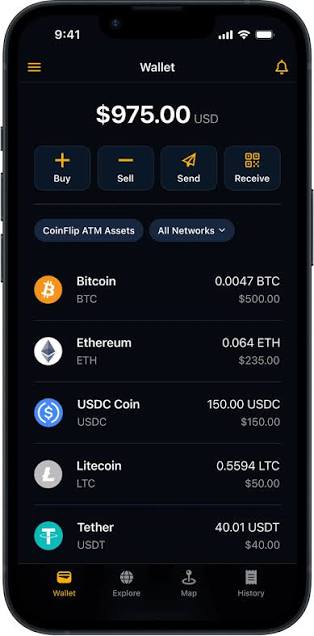
Core assets shown in the app include Bitcoin (BTC), Ethereum (ETH), USDC, Litecoin (LTC) and Tether (USDT), with balances filterable by network. It is deliberately a curated list, not a 10,000-token DeFi wallet — check the current in-app list before assuming a specific token is supported.
Is CoinFlip Wallet better than MetaMask or Trust Wallet?
Different tools. Choose CoinFlip Wallet if you use CoinFlip ATMs and want integrated support and simplicity. Choose MetaMask for serious dApp/DeFi work on EVM chains. Choose Trust Wallet for the broadest mobile multi-chain coverage. For long-term storage of significant sums, a hardware wallet beats all three.
Does the CoinFlip Wallet charge fees?
Holding, sending and receiving cost nothing beyond blockchain network fees, which go to miners/validators, not CoinFlip. Buying, selling and swapping inside the app carry service fees and spreads — see our full fees teardown for details, per the pricing disclosed at coinflip.tech.